Skip to content
autostand
v1.0.0 · local-first · open source · MIT

Automate your standup.Know what you did.

autostand gathers your commits, PRs, and notes — then writes your daily standup for you.

macOS, Windows and Linux. The bundles are unsigned, so the first launch takes one extra step — spelled out with the downloads.

autostand — Dashboard
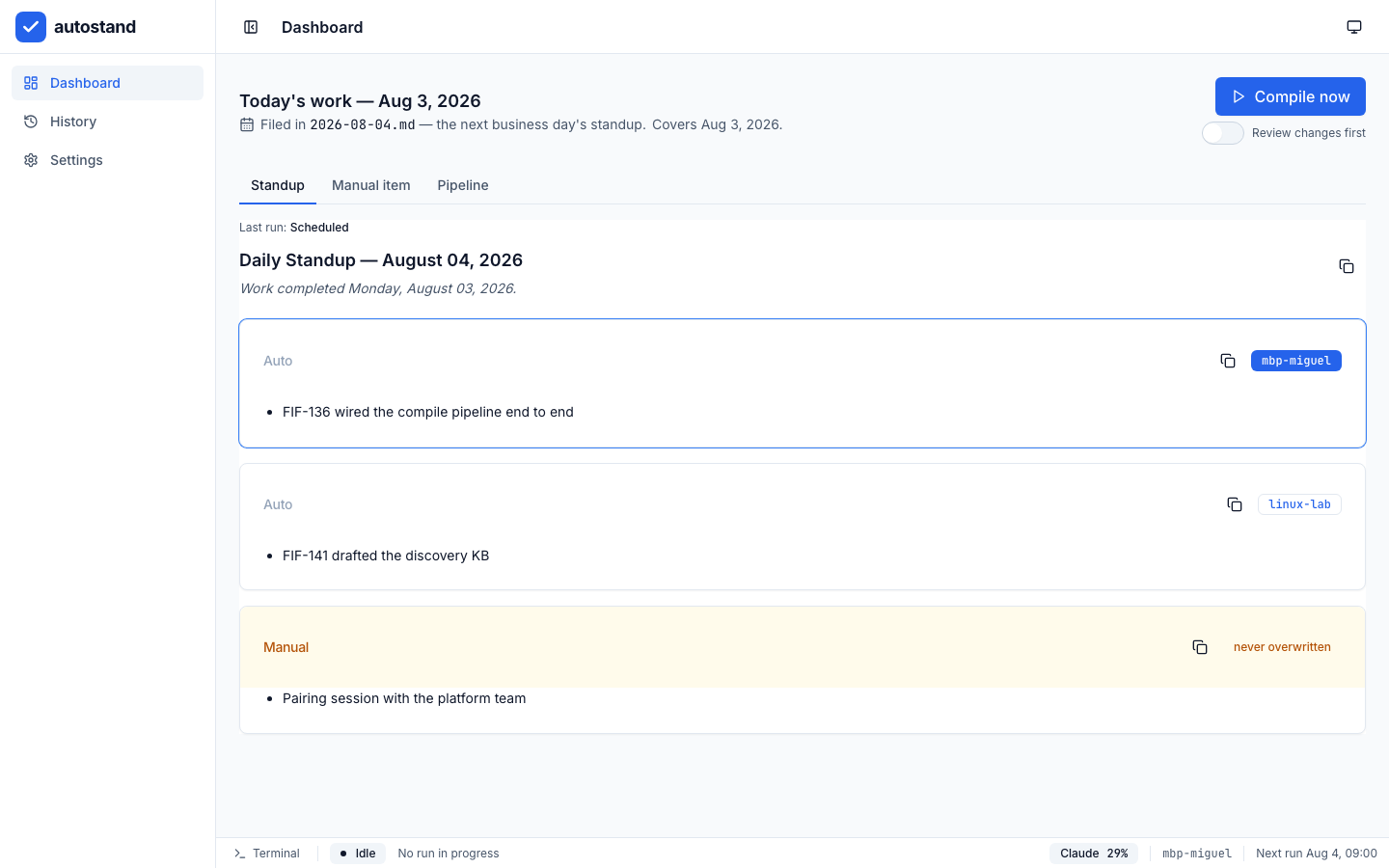
The autostand dashboard, headed “Today's work — Aug 3, 2026” and filed in 2026-08-04.md, the next business day's standup. Two AUTO blocks sit under it, one per machine — mbp-miguel and linux-lab — above a MANUAL block badged “never overwritten”.
Monday's work, filed into the next business day's standup. One AUTO block per machine; the MANUAL block is yours.

Download

autostand 1.0.0

One installer per platform, attached to the GitHub release. Every bundle carries its own inference sidecar, so the built-in local provider works with no Ollama, no Homebrew and no system llama.cpp. None of the three is signed — each card says what your OS will show you and how to get past it.

  • macOS

    autostand_1.0.0_aarch64.dmg

    Apple Silicon. Intel Macs run the same build through Rosetta 2.

    Download for macOS

    macOS will say the app is damaged. It is not.

    The bundle carries no Developer ID signature, so macOS quarantines it and Gatekeeper reports the most misleading message it has. Clear the quarantine flag once, in Terminal:xattr -rd com.apple.quarantine /Applications/autostand.appRun it only on a build you took from this release page — that flag is the check that protects you from a tampered download.
  • Windows

    autostand_1.0.0_x64-setup.exe

    64-bit Windows. An NSIS installer, not a portable executable.

    Download for Windows

    SmartScreen will interrupt the installer.

    The installer is unsigned for the same reason the macOS bundle is, so Windows shows the blue “Windows protected your PC” screen. Choose More info, then Run anyway. Signed builds ship as soon as the codesigning secrets are configured.
  • Linux

    autostand_1.0.0_amd64.AppImage

    x86_64 with glibc 2.35 or newer. Mark it executable and run it.

    Download for Linux

    Not every distribution, and not ARM.

    Built on Ubuntu 22.04, so it needs glibc ≥ 2.35 on x86_64: Ubuntu 22.04+, Debian 12+, Fedora 36+, Arch and openSUSE Tumbleweed run it. RHEL 9 and its rebuilds ship glibc 2.34, and Alpine, anything else on musl, and ARM machines are out. AppImages self-mount through FUSE 2; where only FUSE 3 is installed, run it with --appimage-extract-and-run.

There is no updater. autostand ships no updater plugin and never checks for a new version, so moving to a later release means downloading it from the same page. Read the 1.0.0 release notes.

One compile a day

Gather the day's work, render it, write it, commit it. Here is what each step actually does.

  • Eight sources, all read-only

    Local git is authoritative and always on. On top of it autostand reads GitHub through the gh CLI, plus Claude Code, Remember, OpenCode, Codex, Gemini CLI and Grok CLI sessions. Every one of them is opened for reading; the only files autostand writes are your standup and its own state.

  • Six providers, one of them built in

    Claude, Ollama, OpenAI/Codex, Gemini and Grok each run their own CLI first and that vendor's API second. The sixth ships with the app: a curated GGUF model, downloaded only when you ask for it and run through a process-isolated llama.cpp sidecar that opens no listening socket. A deterministic renderer sits under all six.

  • Real quota, from the logins you already have

    Usage probes for nine providers read the credential each vendor's own tool already wrote — Claude, Codex, Cursor, Copilot, Devin, Grok, OpenCode, OpenRouter and Z.ai. Credits, dollar balances and “N searches left” are reported as themselves instead of being flattened into a percentage, and a value nobody reported reads No data, never 0%.

  • Failover that only skips a measured dead end

    A provider is passed over when its own reading says exhausted, rate limited or sign-in required — never because its quota is simply unknown. A burn-rate projection answers what a bare percentage cannot: 40% left is comfortable four hours into a five-hour window and alarming ten minutes in.

  • One AUTO block per machine

    Each host owns its own AUTO block inside the day's file, so a laptop and a desktop never overwrite each other. git owns what was already committed, so notes that restate it are scrubbed, and a bullet the new render missed is put back — accumulate adds, it never deletes. Your MANUAL notes are never rewritten.

  • Your own prompt never comes back as work

    autostand drives the same coding CLIs it reads sessions from, and those CLIs log the invocation. Left alone, the render prompt returns on the next run dressed as something you did, and the model is shown its own output format as activity. It is filtered out at the message and at the line, before it can reach a standup.

  • Runs on a schedule, and repairs a missed one

    Installs a launchd agent, a systemd --user timer or a Task Scheduler job — your OS's own scheduler, not a daemon of ours. A run that never happened is refilled from the git log and the notes still on disk, and a day that already has content is frozen rather than rewritten from partial evidence.

  • The day it files under is yours to choose

    Today's work can go to tomorrow's standup — the rule the original script used, and the default — or to today's own. Either way weekend work accumulates into Monday's file rather than landing nowhere, and every window starts the day after the last one ended, so nothing is lost or counted twice.

  • Every process visible, never its arguments

    git, gh, the provider CLIs, the local sidecar, keychain reads and scheduler probes all go through one spawner and report into the Terminal panel. What they are never allowed to report is their argv, which carries repository paths and branch names.

The quota you actually have left

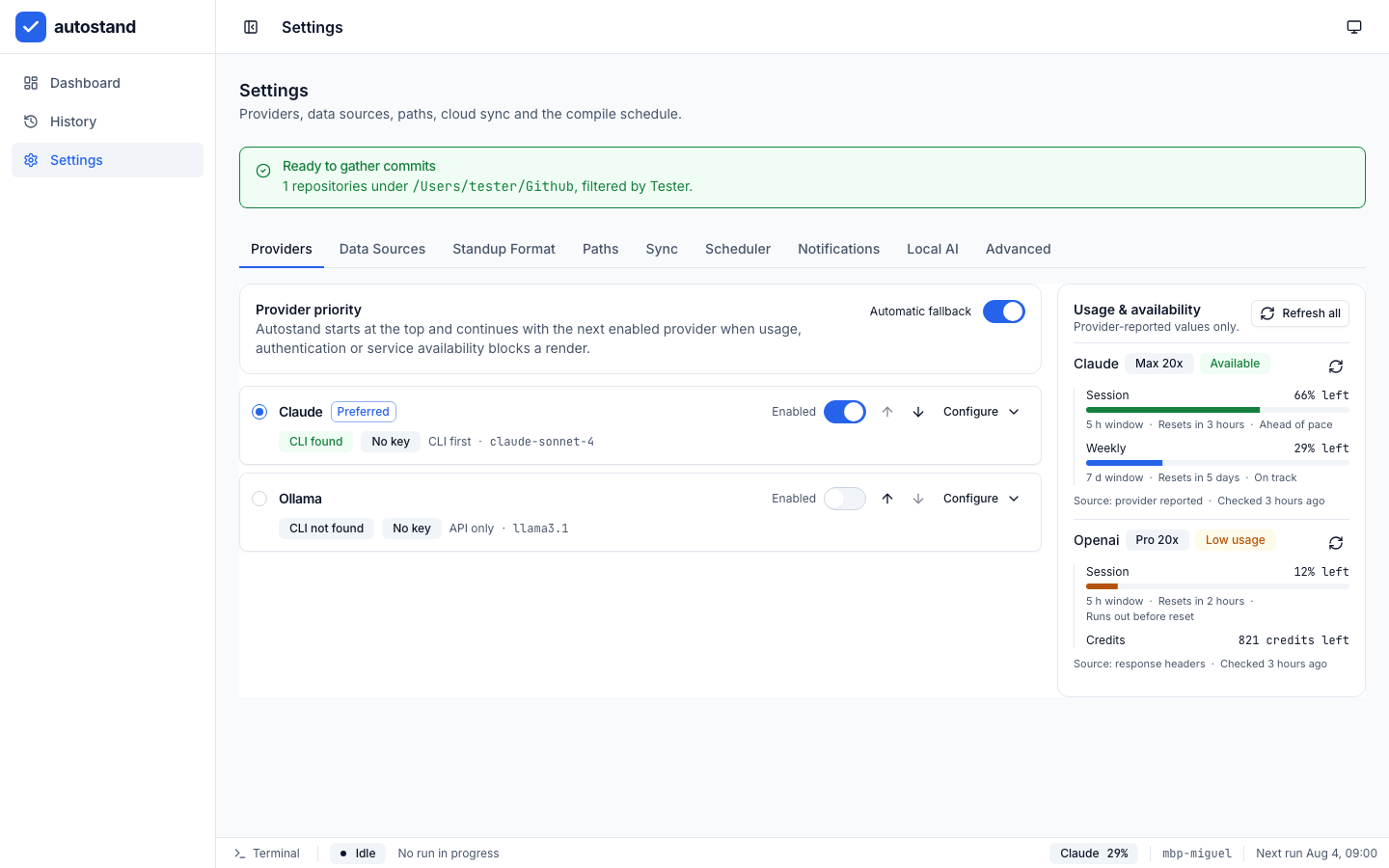
Settings → Providers reads the logins already on your machine and prints what each vendor reports: the plan, the window, how much is left and whether you are ahead of or behind pace. Nothing is inferred, nothing is written back, and the same reading drives the badge in the status bar and the order the failover chain is walked in.

autostand — Settings › Providers
Settings → Providers with the Usage & availability rail populated. Claude, on a Max 20x plan, reads Available with 66% left of a five-hour session and 29% left of the week, marked ahead of pace and on track. Openai, on Pro 20x, reads Low usage with 12% of the session left, a “Runs out before reset” warning, and 821 credits left.
Provider-reported values only. Percentages where the vendor reports a window, credits where it reports credits.

Usable with no account at all

The sixth provider is not a vendor. Settings → Local AI downloads a curated GGUF model on request and runs it through an isolated llama.cpp sidecar that ships inside every bundle. No sign-in, no key, no Ollama, no Homebrew.

autostand — Settings › Local AI
Settings → Local AI showing the Built-in local AI panel: download and select a private GGUF model for offline provider fallback, with its model catalog loading.

A sidecar for every render

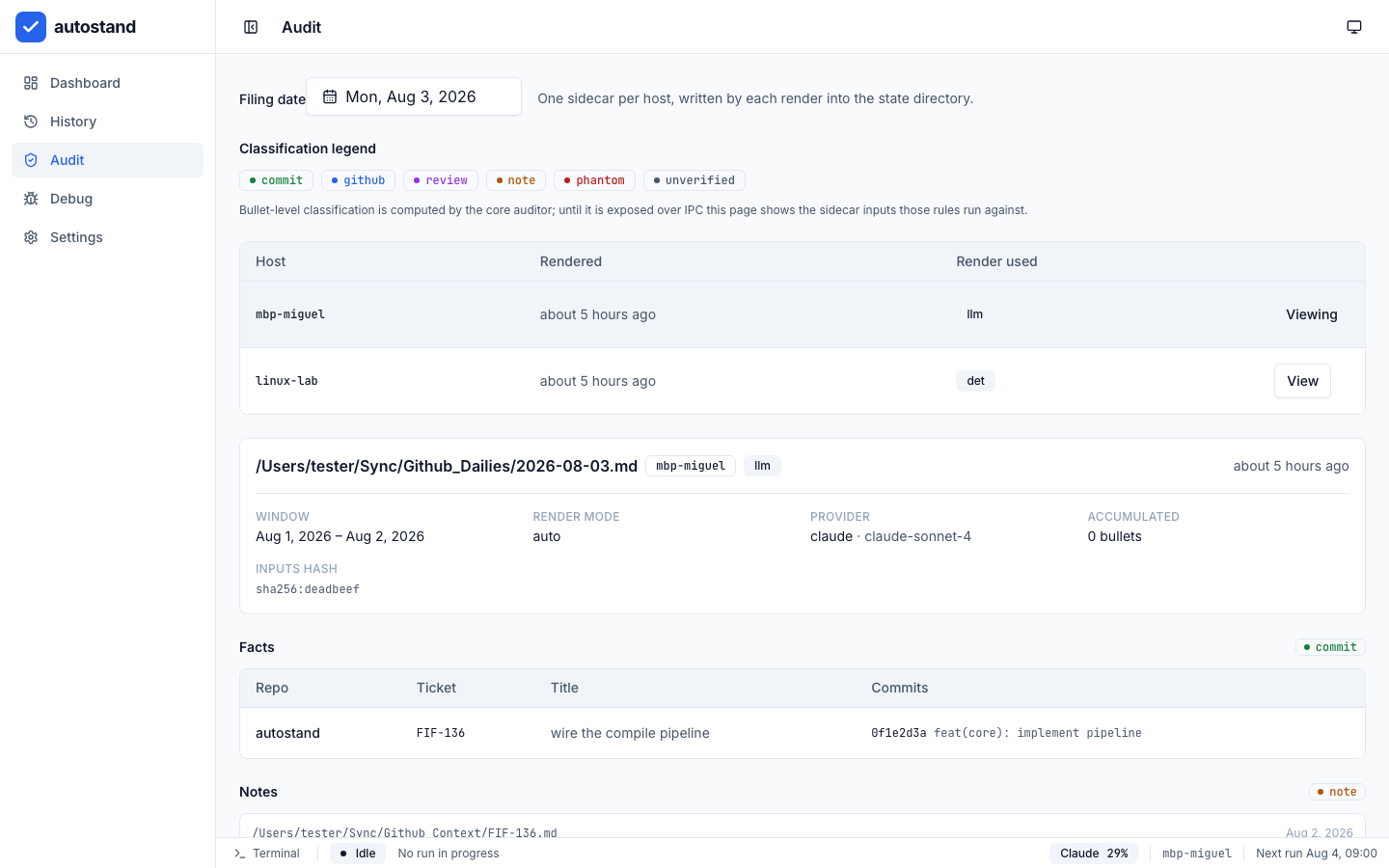
Each compile writes a provenance record into autostand's own state directory — one per host, never into your dailies repo. It keeps the window, the render mode, the provider and model, and every commit and note that went in.

autostand — Audit › 2026-08-03.md
The Audit screen for Monday, August 3 2026: a sidecar per host — mbp-miguel rendered by an LLM, linux-lab rendered deterministically — over the file 2026-08-03.md, with its window, render mode, provider, model and inputs hash, the commits behind it, and a legend for the six bullet classifications.

Pipeline

How it works

One trigger, six steps, always in this order. Nothing is written until the last two. The trigger is normally your machine's own scheduler — a launchd agent, a systemd --user timer or a Task Scheduler job — so a closed app still files a standup, and a missed run is filled from what is already on disk.

  1. 1

    Gather

    Reads your local git history, your GitHub activity through the gh CLI, and your Claude Code, Remember, opencode, Codex, Gemini and Grok sessions across the last two business days.

  2. 2

    Scrub

    Drops every note that repeats work git already reported, and every note that claims a ticket whose commits landed outside the window.

  3. 3

    Render

    Sends the scrubbed facts to the first healthy provider in your order — Claude, Ollama, OpenAI/Codex, Gemini, Grok or the built-in local model — and renders deterministically instead when every one of them is missing, exhausted or returns something the validator rejects.

  4. 4

    Merge

    Replaces this machine's AUTO block in the dated Markdown file, puts back any earlier bullet the new render missed, and leaves your MANUAL notes exactly as you wrote them.

  5. 5

    Audit

    Writes a local sidecar holding every input it used, so each bullet can be traced back to the commit, pull request, review or note behind it.

  6. 6

    Commit

    Stages the standup file, commits it with the dates it touched, and pushes.

Provenance

Every bullet says where it came from

Each compile writes an audit sidecar into autostand's state directory, never into your dailies repo. It records the commits, pull requests, reviews and notes that went in, so any line in the file can be traced back to the thing that produced it — or exposed as a line with nothing underneath it.

2026-08-03.md

AUTO block for mbp-miguel · window Aug 01–02

Example data
Standup bulletMatched sourceClass
Implemented the LlmAdapter trait for all six providersa3f19c2 — feat(adapters/llm): implement 6 providerscommit
Opened autostand #41 — deterministic renderer fallbackPR #41, opened Aug 01github
Approved autostand #38 — IPC contractsReview on #38, Aug 02review
Paired on the cron parser with the platform team.remember/now.md, Aug 02note
Fixed the retry logic in the billing workerFIF-118 — commits only on Jul 28, outside the windowphantom
Drafted the provider support matrixNo matching sourceunverified

The billing-worker line is a phantom. It reads like work, but its ticket has no commit inside the window — a sentence carried over from a day that was already filed. One phantom fails the audit, and you find out before anyone else reads the standup.

What the classes mean

commit
Matches a commit in your local git history.
github
Matches a pull request or issue read through the gh CLI.
review
Matches a pull request review you left inside the window.
note
Matches a note of yours that survived the scrub.
phantom
Claims code work no commit backs. The audit fails.
unverified
No matching source at all. A warning, not a failure.

Questions

Before you run it

There is no autostand server, no account and no telemetry. The only outbound traffic is the request to the AI provider you configured — none at all when you render with the built-in local model, with Ollama, or with the deterministic renderer — plus git push and the gh CLI talking to GitHub with your own credentials. Gathering, scrubbing, writing and the audit trail all happen on your machine.

Something else? Open an issue.